Easter Clipart: Practical Ways to Use Digital Illustrations for Spring Projects
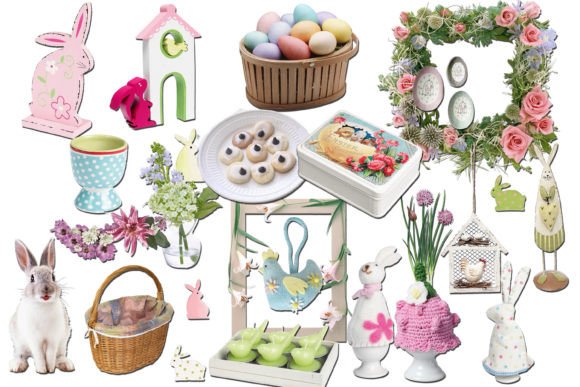
Spring brings a surge of creative energy, and for many designers, small business owners, and hobbyists, that energy translates into a need for high-quality visual assets. Easter clipart is more than just cute bunnies and painted eggs; it is a versatile design resource that can streamline your workflow and elevate the look of your seasonal projects. Whether you are preparing for a church event, launching a spring sale, or creating personalized gifts for family, having access to professional-grade digital illustrations saves time and ensures a polished result.
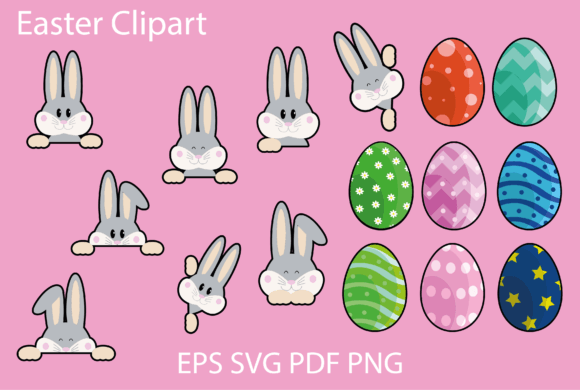
This particular collection offers sixteen distinct design elements, provided in a comprehensive ZIP folder containing PDF, SVG, EPS, and PNG formats. Understanding how to leverage these specific file types can make the difference between a frustrating design experience and a seamless creative process. Let’s explore how these assets fit into real-world scenarios and why having the right format matters for your specific needs.
Bridging the Gap Between Digital Design and Physical Crafts
One of the most common uses for this type of vector graphics package is in the world of DIY crafting. If you own a cutting machine like a Cricut or Silhouette, you know that not all image files are created equal. The inclusion of SVG files in this bundle is critical for these users. SVG (Scalable Vector Graphics) allows your cutting software to read the lines of the illustration precisely, ensuring clean cuts without jagged edges or unnecessary waste of vinyl or cardstock.
Imagine you are creating custom stickers for a local Easter egg hunt. Using the transparent background PNGs might work for printing, but for cutting out individual shapes from adhesive vinyl, the SVG format is superior. It tells the machine exactly where to cut around the bunny or the chick. Before purchasing, it is vital to check that your specific cutting software accepts SVG files. Most modern machines do, but verifying compatibility prevents disappointment when you are ready to start creating.
Beyond stickers, these designs are perfect for scrapbooking. Digital scrapbooking has grown in popularity because it allows for endless experimentation without the cost of physical paper. You can drag and drop these 12″x12″ artboard-ready illustrations into your digital layouts, layering them with photos from last year’s holiday celebrations. The vector nature of the files means you can resize them without losing quality, whether you need a tiny accent for a corner or a large centerpiece for a page spread.
Professional Applications for Small Businesses and Marketers
For entrepreneurs and marketers, spring is a key sales period. Retailers, bakeries, and service providers often refresh their branding temporarily to match the season. This is where the EPS and AI-compatible vector files become invaluable. Unlike raster images (like JPEGs), vector graphics can be scaled to any size without pixelation. This makes them ideal for logos or large-format decorations.
Consider a local bakery launching a special line of Easter-themed cupcakes. They need eye-catching signage for the counter and digital ads for social media. By using the EPS files, a graphic designer can import the clipart directly into Adobe Illustrator, adjust the colors to match the bakery’s brand palette, and scale the image up for a window decal or down for an Instagram story. The flexibility of vector graphics ensures that the brand looks consistent across all platforms.
Bloggers and web designers also benefit significantly from these assets. Web design requires fast-loading, crisp images. The PNG files provided in this set come with transparent backgrounds, which is a crucial feature for web use. A transparent background allows the illustration to sit seamlessly over any colored section of a website or blog post without an unsightly white box surrounding it. This creates a more professional and integrated look for spring-themed landing pages or newsletter headers.
Educational and Community Uses
Educators and community leaders often find themselves scrambling for resources as holidays approach. Teachers looking to create engaging classroom materials can use these printable PDF files to design worksheets, reward charts, or classroom decorations. The 12″x12″ dimension is standard for many home and office printers, making it easy to produce high-quality handouts without needing specialized equipment.
Churches and community centers frequently host spring festivals or nursery events. The versatility of this clipart set allows organizers to maintain a cohesive theme across various materials. You might use the same bunny illustration on the party invitations, the welcome banner, and the name tags for children. Consistency in design helps create a memorable and organized experience for attendees. Because the files are digital downloads, there is no waiting for shipping, which is essential when planning events on a tight timeline.
What to Consider Before You Download
While the convenience of digital downloads is undeniable, there are practical considerations to keep in mind to ensure you get the most out of your purchase. First, assess your technical comfort level. If you are new to design software, starting with the PNG files might be easier, as they can be used in basic programs like Microsoft Word or Canva. However, if you want to edit colors or manipulate shapes, you will need software that supports SVG, EPS, or AI files, such as Adobe Illustrator, Inkscape, or Affinity Designer.
Second, think about your end product. Are you printing physically or publishing digitally? For physical prints, the resolution and vector quality matter immensely. The vector formats (SVG, EPS) ensure that even if you print a small detail on a large poster, it remains sharp. For digital use, file size and transparency are key. The provided PNGs with transparent backgrounds are optimized for this purpose, allowing for easy integration into websites and social media graphics.
Finally, consider the licensing and usage rights. While this article focuses on the technical and creative applications, always review the specific license terms provided by the creator. Generally, these types of clips are suitable for personal and small commercial use, such as selling physical items like stickers or printed invitations. However, reselling the digital files themselves is typically prohibited. Understanding these boundaries protects you and respects the artist’s work.
Maximizing Your Creative Output
The true value of this Easter clipart set lies in its adaptability. It is not just a collection of images; it is a toolkit for spring creativity. By offering multiple file formats, it accommodates users at different skill levels and with different technical needs. Whether you are a seasoned graphic designer tweaking vectors in Illustrator or a parent making homemade cards with a cutting machine, there is a file format here that works for you.
Take the time to organize your downloaded files. Create folders for each format so you can quickly locate what you need when inspiration strikes. Experiment with combining elements; perhaps layer a floral vector behind a bunny SVG to create a unique composite image. The 16 design elements provide enough variety to mix and match, ensuring your projects feel fresh and original rather than repetitive.
In a digital age where content is consumed rapidly, having access to high-quality, versatile assets like these can give your projects a professional edge. From enhancing your brand’s seasonal appeal to creating cherished family memories through scrapbooking, Easter clipart serves as a bridge between idea and execution. By choosing the right format for your tool and understanding the potential applications, you transform simple digital files into meaningful, tangible results.